Start with one musical goal
Choose a short chord progression or riff. You might want to make the rhythm steadier, find a melody over the chords, or hear how a new phrase fits. Keep the first recording simple enough that you can play it comfortably more than once.
1. Tune up and choose your tempo
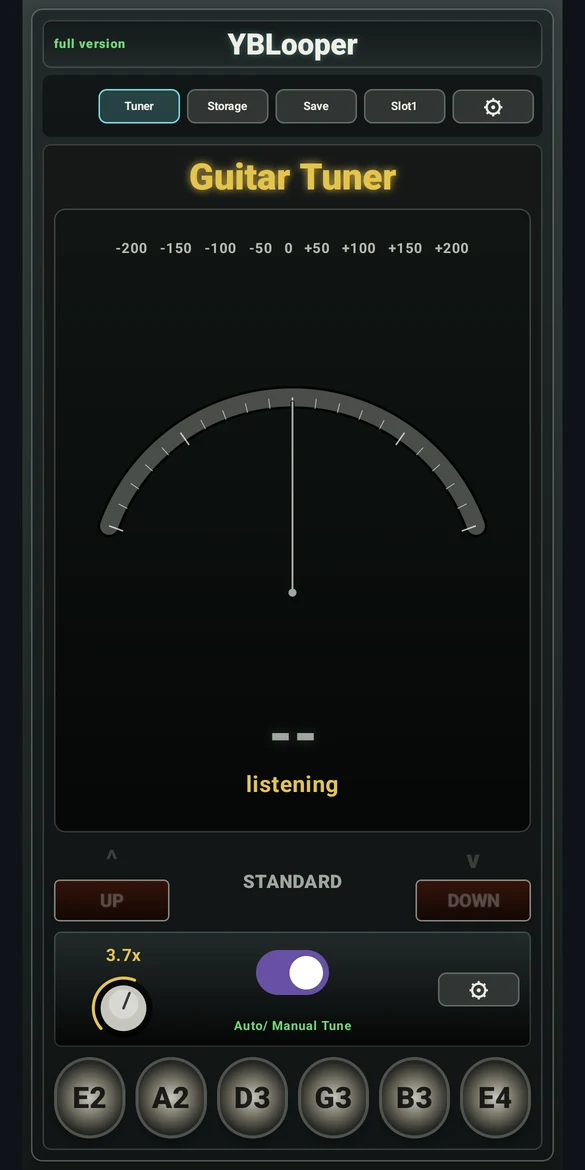
Open Tuner in YBLooper. Play one string at a time, let the note settle, and use automatic detection or select a string manually. Choose the tuning preset that matches your guitar.
Return to the main screen and set a comfortable metronome BPM. In Settings, turn on REC Count-in if you want time to get ready before recording. Adjust metronome volume to suit your room.
2. Record a short rhythm part
Place the phone where it can hear the instrument clearly. Begin with a moderate input gain and listen for distortion caused by an overly loud input. Tap the main REC footswitch to start; if count-in is on, wait for it to finish.
Play your phrase, then tap the same main footswitch again to finish recording and start playback. Listen to the join between the end and beginning. Adjust loop start or end timing in Settings when needed, or record a fresh take.
3. Play along, then change one thing
Use the repeated rhythm as a musical reference. Try a short melody, an alternate chord voicing or a different picking pattern. Change one thing at a time so you can hear the difference.
For timing practice, play fewer notes and leave rests. For melodic practice, repeat a phrase and vary its ending. A looper is useful because the accompaniment stays the same while you explore.
4. Explore the effects pedalboard
Select an effect pedal to open its controls. Try a small amount of reverb, a delay pattern or a different distortion setting. Use bypass to compare the sound, and watch your listening level when adjusting gain.
YBLooper includes distortion, chorus, stereo widening, ping pong delay and reverb. The app’s mode determines which controls are available.
5. Keep an idea you want to revisit
Select the loop slot you want to use and save the recording. Open Storage to load it later or share the file. If a slot already contains a take you need, share or back it up before replacing it.
You can continue with the original WAV file in a DAW. Follow the guide to saving and sharing WAV recordings for the next step.
A small routine you can repeat
- Tune the instrument and choose one idea.
- Record a short, steady part.
- Play along and listen to your timing.
- Save a useful take before moving on.
Consistency matters more than making a complicated loop. A few focused minutes can give you a recording to compare with the next session.